Private by Routing: How I Built a Personal Development Cloud
I wanted always-on agents, real HTTPS, and remote development that felt like the internet without exposing any of it on the internet. Here's where I landed.
TailscaleHomelabCaddyDevOpsPrivacy
In the age of personalized software, I wanted a personal cloud. The idea came down to three things:
Agents and dev servers die when the laptop closes. My workspaces should feel like they're on the internet. app.dev.example.com in a real browser, from any machine should be reachable by only me.
I had perfectly good compute sitting around (M1 Mac mini, 2016 TB MBP, NZXT prebuild 3080 Ti) and wanted to use each machine for what it does best.
I wanted moving between them to feel like a seamless development experience rather than a collection of boxes I had to babysit.
Of course, why not "just SSH and port-forward"? You're right, it works. But it fails the moment a browser, cookie, or teammate-shaped future shows up.
So I networked my machines together, gave their apps real names and trusted HTTPS, and made the whole setup easy for both me and my agents to reach.
And of utmost importance was doing all of that without any of it being exposed to the public internet.
Requirements that drove the design
My acceptance criteria can be boiled down to this: I want an always-on hub for AI agents that doesn't sacrifice security.
It should foster long running terminals, tests, CI, and local web apps. It's important to consider that I'll primarily be working from a laptop that sleeps and changes networks.
I should have native Linux for when macOS is the wrong kernel for the use case. I don't want to deal with the bloat that comes with turning my mini into a hypervisor.
If my meager machine can drive it, I want local GPU inference that doesn't live on a public API.
For my web-facing projects, browser-trusted HTTPS and readable hostnames were a priority. Insecure origin browsers are too much of a tax in 2026.
ZERO PUBLIC INGRESS. This includes port-forwarding and funnels.
Translating requirements to decisions
I always start projects by identifying requirements. Only after do I look for solutions. That keeps me from asking one product to solve every part of the problem. The requirements exercise ended up with this:
Constraint
Consequence
No public listeners
Apps bind to loopback; the proxy binds to the Tailscale IP
Always-on work
Select machines stay awake while the others take specific roles
Real names and certificates
Public DNS and ACME DNS-01, since there is no public port 80
Multiple machines, one namespace
A wildcard for the hub and nested wildcards for additional hosts
Laptops sleep and change networks
Mosh keeps the connection alive; Herdr keeps the workspace alive
The three-layer mental model
The approach hinges on understanding the roles of the three layers that work together:
Job
Layer
Who is this device, can it communicate?
Tailscale (identity, WireGuard, policy)
What is this app called?
Public DNS pointing at a Tailscale address
How does a browser reach it?
Caddy on the Tailscale IP, proxying to loopback
Tailscale is identity, not just "the VPN"
A traditional VPN is a tunnel into a network: you connect to a gateway and gain access to the machines behind it. Tailscale adds a control plane on top: it builds a WireGuard-based mesh in which each enrolled device:
MagicDNS is the syntactic sugar making the act of connecting easy. ssh user@<SOME.OPAQUE.IP> becomes ssh user@machine1.
My laptop talks directly to the mini, GPU workstation, or Linux laptop. The control plane handles identity, key exchange, discovery, and policy; WireGuard carries application traffic between peers.
Public DNS for private addresses
I wanted names under a domain I control rather than
MagicDNS names. So *.dev.example.com resolves in public DNS to the mini's
Tailscale IPv4 address.
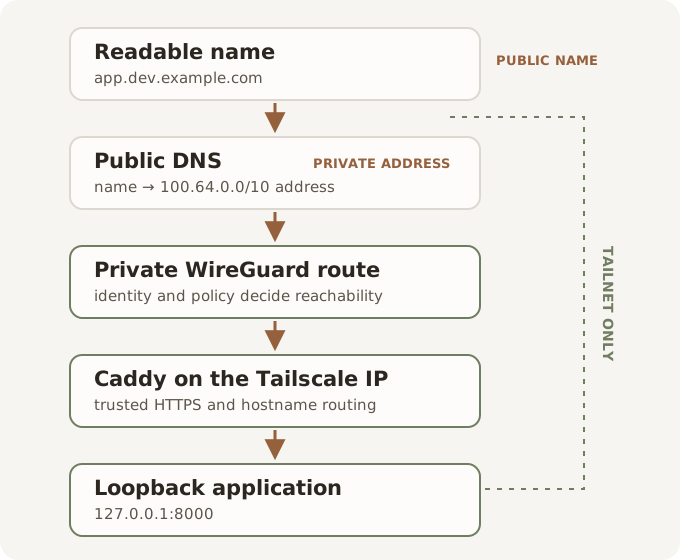
That sounds like exposing the service, but DNS only tells a client which address belongs to a hostname; it does not make that address reachable. A device outside my tailnet can
look up app.dev.example.com and receive an address in 100.64.0.0/10, but it
has no route to that Tailscale peer or authorized identity. A device inside the tailnet follows the same DNS answer and can reach the
address directly over WireGuard.
There is a tradeoff here: names are public metadata. Anyone can query the DNS
record, and publicly trusted certificates can expose hostnames through
Certificate Transparency logs. I'm not running any stealth projects.
The boundary I care about is whether the service behind it is reachable.
This split gives browsers ordinary, memorable hostnames while Tailscale still
decides who can send traffic to them. Public name, private route.
Caddy is the only intended ingress
The applications themselves listen on 127.0.0.1. Caddy listens on the mini's Tailscale address and reverse-proxies each hostname to the right loopback port.
Those two binds are the boundary. If the app listens on 0.0.0.0, it may be reachable from networks I did not intend. If Caddy listens on the LAN address, the proxy has escaped the tailnet. I don't need either.
HTTPS is important to consider. Tailscale answers whether two devices may communicate. TLS proves to the browser that the process at the other end is allowed to call itself app.dev.example.com. Cookies, service workers, WebAuthn, and the web at large care about HTTPS.
Since public ingress is a no-go, HTTP-01 certificate validation was out. DNS-01 lets Caddy request a certificate, publish the CA's TXT challenge through my DNS provider's API, and complete validation without opening port 80. The Caddy binary on each system needed a module for my DNS provider so it can manage certs.
Now that everything is connected, my laptop became a gateway to so much more. I ended up with four roles spread across the hardware I already owned:
Client laptop | editor, browser, Mosh; sleeps and changes networksMac mini | always-on hub; agents, sessions, and *.dev.example.comGPU workstation | local models and observability; long running services; its own DNS subtreeLinux laptop | native Linux for work that needs the Linux kernel
The Mac mini is the operational center because it is quiet, low-power, and always on. Repositories, agents, dev servers, and long-running tests live there. It coordinates the work, but it is not a subnet router and does not need to become a hypervisor.
The GPU workstation is a bounded compute tier. It can run quantized local models and keep the dashboards and metrics for those workloads close by.
The Linux laptop exists because sometimes the kernel is the feature. Making it a native Tailscale peer was less work than virtualizing Linux on the mini. It gets its own keypair, address, firewall, and application boundary like every other machine.
And for fun I've got my phone and iPad loaded with Tailscale. No, I have not connected a terminal or agents to them intentionally. I'd be checking things way too often. But I've got access to my files in the meantime ;).
Persistent work, not persistent SSH
Closing my laptop used to kill the agent running on it. The answer was not to stop closing the laptop. The agent should never have lived there.
In the spirit of layers, I treat remote work as four separate ones in my daily workflow:
Layer
Job
SSH
Proves who I am to the shell and chooses the right key
Mosh
Keeps the connection usable through sleep, roaming, and network changes
Herdr
Keeps agents, servers, tests, and logs running after the connection vanishes
Remote editor
Keeps files and builds on the remote while the interface stays on my laptop
Mosh handles the unreliable pipe. It uses UDP, so the host firewall must allow its port range on the Tailscale interface. Herdr handles the durable workspace. When the laptop wakes up on another network, I reconnect to the same work instead of reconstructing it from shell history. It's a slick TUI.
Tailscale membership does not automatically grant shell access. Overlay identity and SSH identity remain separate. I still distribute keys deliberately and use key-only SSH.
Layers of responsibilities: SSH knows who opened the workspace. Mosh keeps a path to it. Herdr keeps it alive. The editor makes it comfortable. No one layer pretends to do all four jobs.
Growing the cloud
A new app on the network takes three steps:
Bind it to 127.0.0.1.
Add a Caddy site bound to the Tailscale IP.
Reload Caddy.
The wildcards do the legwork, so I do not add a DNS record for every dev server. The app receives a readable URL and a trusted certificate without becoming a new network listener.
Hosts with their own ingress get a nested wildcard instead of competing for the hub's flat namespace:
*.dev.example.com -> mini*.gpu.dev.example.com -> GPU workstation*.linux.dev.example.com -> Linux laptop
Each host runs its own Caddy process, binds to its own Tailscale address, and enforces its own firewall. This lets me do things like run Grafana on the GPU station specific to my Ollama setup at grafana.gpu.dev.example.com.
Loopback comes first on the GPU host too. Ollama, Open WebUI, Grafana, Prometheus, and Dozzle do not become safe merely because they sit on a tailnet. A raw model API stays on loopback. A dashboard gets application authentication before it gets a vanity URL.
As the number of apps grew, I split Caddy sites into conf.d/*.caddy and passed the Tailscale IP into each imported file.
Private by routing is not private by policy
This architecture is private by routing, not private by host policy. A device outside the tailnet has no path to the service. A device inside it can still reach whatever Tailscale ACLs, the host firewall, SSH, Caddy, and the application permit. I could take it a step further and implement an ACL, but that would be overkill for my single-user needs.
I treat the boring controls as part of the setup rather than a hardening project for later:
Every host uses key-only SSH. I verify access from a second machine before disabling passwords, and I keep a LAN recovery path before considering a Tailscale-only SSH bind.
Host firewalls stay on. A successful tailscale ping proves that WireGuard can reach the peer, not that an application port is open or correctly restricted.
Anything leaving loopback gets its own authentication. Open WebUI gets an admin account, Grafana loses anonymous admin, and raw Ollama remains private to the host.
Recovery has a documented procedure. For example, a stolen laptop means disabling its Tailscale node and rotating its SSH keys... a leaked DNS token gets revoked and replaced.
Public metadata and secrets also need distinction and careful handling. DNS names, certificate logs, and the existence of this architecture are public. DNS API tokens, tailnet names, usernames, real addresses, and unresolved security gaps are not.
What I prioritized
The architecture became easier to reason about once I stopped making exceptions:
No Funnel or tunnel whose purpose is public reachability.
No router port forwarding.
No app bound to 0.0.0.0 "just for now."
No unauthenticated dashboard on a tailnet IP.
No second flat wildcard when another host joins.
No VM host on the mini just to get a Linux kernel.
No pretending MagicDNS device names are application URLs.
The result is a small cloud I control: agents that survive a closed lid, HTTPS that browsers trust, a GPU that is not an API vendor, and a Linux machine that is just another peer.
If you want to adopt some or all of this pattern, the sanitized cookbook, including the Caddyfiles, nested DNS records, SSH fragments, firewall notes, and ACL skeleton is in the reference architecture gist.